Register your seeds
Give your items their own tab in the management clipboard picker. Without a registration, Clipwise groups them by item ID prefix.
You need: Clipwise 1.0+ for testing, and a MelonLoader mod project. Clipwise is optional for your players.
-
Copy
Clipwise.csinto your project and compile it.<Compile Include="path\to\Clipwise.cs" /> -
Declare Clipwise as an optional dependency.
[assembly: MelonOptionalDependencies("Clipwise")] -
Declare a category. This creates one tab.
using Clipwise.Api;var tab = Clipboard.Category("yourname.yourmod", "exotics", "Exotics", sortOrder: 500);sourceis the reverse-DNS ID of your mod. The tab key issource:id.sortOrderorders the tabs. Lower values come first. Vanilla is 0.iconItemIdis optional. It names an item whose icon represents the tab.
-
Add items to the tab.
Itemreturns the tab, so you can chain calls.tab.Item("purple-haze", "yourmod_purple_haze_seed", sortKey: "Purple Haze",tags: new[] { "yourname.yourmod:tier/1" });idis your own stable key. It must be unique insidesource. A second call with the samesourceandidreplaces the first.itemIdis the game’sItemDefinition.ID.sortKeyorders items inside the tab. The default is the display name.descriptionappears in the tooltip.precedencedecides which source wins when several claim the same item. The higher value wins.
-
Optional: name your tags. A tag without a label shows its last path segment on the filter chip.
Clipboard.RegisterTagLabel("yourname.yourmod:tier/1", "Tier 1");
Follow these rules:
- Tags must start with your source, as in
yourname.yourmod:tier/1. The host rejects bare tags. Theclipwise:prefix is reserved. - Call the API from the Unity main thread only.
- Every call is a no-op while Clipwise is absent. Calls made before Clipwise loads are replayed when it loads.
Register without wiring a Core
Section titled “Register without wiring a Core”Add a static class named ClipwiseProbe with a static Register() method in the global namespace. Clipwise finds it and calls it once. Call Clipboard.AutoRegister() from a [ModuleInitializer] in the same file if you want the call at bind time.
internal static class ClipwiseProbe{ internal static void Register() { Clipboard.Category("yourname.yourmod", "exotics", "Exotics", sortOrder: 500) .Item("purple-haze", "yourmod_purple_haze_seed"); }}Keep this type name even when you register nothing. Clipwise finds it by name. Without it, Clipwise scans all types of your assembly, and that scan can crash a mod with many IL2CPP references.
Check it works
Section titled “Check it works”Start the game and open the log. Clipwise writes Clipwise: picked up N mod probe(s). when it finds a ClipwiseProbe. Then pick up the management clipboard and click a pot’s seed field. The picker shows a section named after your category label, with your items in it. A seed the game itself ships stays under “Vanilla seeds”, and your tags show in its details.
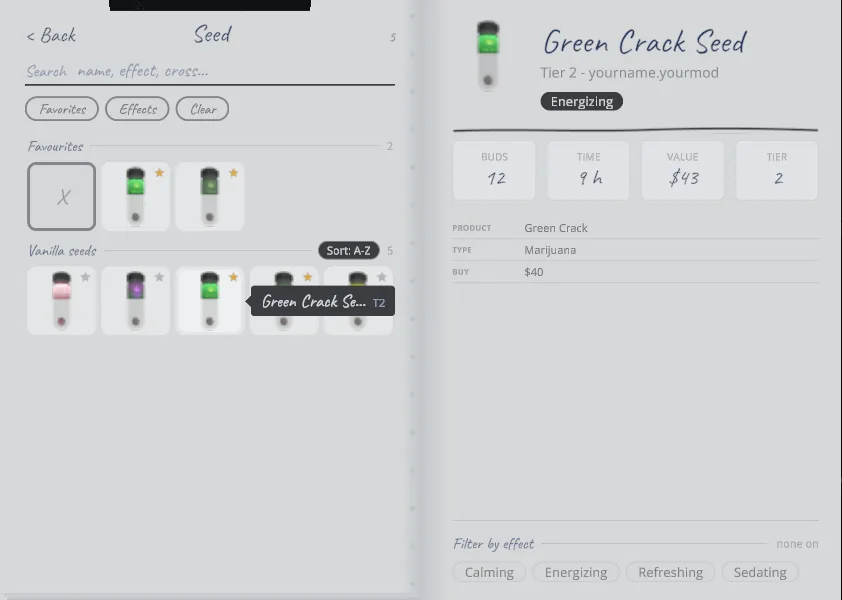
If a registration is rejected, the log shows Clipwise: RegisterItem failed: ... or Clipwise: RegisterCategory failed: ....