Add a panel
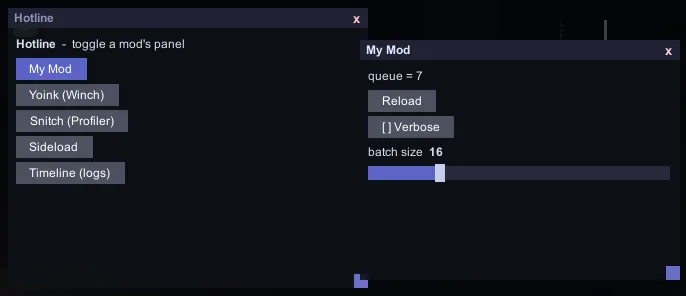
Give your mod its own panel in the Hotline overlay. Players open the overlay with F6 and see your panel as a window. You write no OnGUI and no uGUI.
You need: Hotline in your test game and a MelonLoader mod project. Players do not need Hotline: every call is a no-op without it.
-
Copy
Hotline.csfrom ScheduleOne-HotlineExample into your project. It compiles into your DLL. You can referenceHotline.Api.dllinstead. -
Register a panel. Use your mod name as the panel id.
using Hotline.Api; // Hud, Panel, HotlineKey, LogLevelHud.RegisterPanel("MyMod", "My Mod").Text(() => "queue = " + _queue.Count).Action("Reload", Reload).Toggle("Verbose", () => _verbose, v => _verbose = v).Slider("batch size", 1, 64, () => _batch, v => _batch = (int)v, 1).Hotkey("Reload", HotlineKey.F8, Reload).Log(); -
Optional: put the registration in a static class named
HotlineProbewith a staticRegister()method. Hotline finds and calls it, so you wire nothing intoOnInitializeMelon.
Check it works
Section titled “Check it works”- Start the game and press F6. The overlay opens.
- Open your panel from the Overview window, or run
hotline panel MyMod on. - Run
hotline panels.MyModis in the list.
Builder methods
Section titled “Builder methods”| Method | Result |
|---|---|
.Text(Func<string>) | Multi-line readout, polled a few times a second. |
.Image(Func<int[]>) | Raw ARGB pixels, for example a QR code. Use { width, height, argb0, argb1, ... }. Return null or an empty array to show nothing. |
.Action(string label, Action run) | Button. Runs on the main thread. |
.Toggle(string label, Func<bool> get, Action<bool> set) | On/off control. |
.Slider(string label, double min, double max, Func<double> get, Action<double> set, double step = 0, string unit = null) | Draggable value. See Add a slider. |
.Hotkey(string label, HotlineKey key, Action run) | Central hotkey. Hotline polls it and flags conflicts. HotlineKey.None skips the key. |
.Log() | Show the panel’s log channel. Write with .Write("...") or Hud.Log("MyMod", "..."). |
Static calls exist too: Hud.RegisterPanel, RegisterAction, RegisterToggle, RegisterSlider, RegisterText, RegisterImage, RegisterHotkey, Log.
- Call the API from the Unity main thread. Hotline runs your delegates on the main thread, so they may use game objects.
- Registrations made before Hotline loads are queued. Load order does not matter.
- Your mod may poll a raw
Input.GetKeyDown(KeyCode.Fx). Hotline then adds a button for it to the panel with the same id as your mod name. See How hotkey interception works.