Add host settings
Give the host a form with your settings. Side Hustle sends the chosen values to every player, so you write no netcode.
You need: a registered gamemode with Support set to Multiplayer or Hybrid. See Add a gamemode.
-
Add
HostSettingsto your descriptor. Each entry is one control on the Host form.HostSettings = new[]{new SettingDescriptor{Key = "round_time", Label = "Round time", Category = "Rounds",Type = SettingType.Slider, Min = 60, Max = 900, Step = 30, WholeNumbers = true,Unit = "s", Default = "300",},new SettingDescriptor{Key = "teams", Label = "Teams", Category = "Rounds",Type = SettingType.Segmented, Options = new[] { "Two", "Four" }, Values = new[] { "2", "4" },Default = "2",},new SettingDescriptor{Key = "friendly_fire", Label = "Friendly fire", Hint = "Team mates can hurt each other.",Type = SettingType.Toggle, Default = "0",},},Keyis the wire format. Keep it short and never rename it. All values travel in Steam lobby data, which has a size limit.- The form shows a section header each time
Categorychanges. Sort your settings by category. - Every value is a string. A toggle stores
"1"or"0". A segmented or dropdown control stores the entry ofValues, or the label whenValuesis null.
-
Optional: add
Presets. The host picks one, and its values fill the matching controls.Presets = new[]{new SettingPreset{Name = "Quick round", Hint = "Short rounds, two teams.", Recommended = "Best for 2-6",MinPlayers = 2, MaxPlayers = 6,Values = new Dictionary<string, string> { ["round_time"] = "120", ["teams"] = "2" },},},- A preset whose
MinPlayerstoMaxPlayersrange fits the lobby size can be selected when the form opens.DefaultSelected = truealways selects it. - When the host changes a value, joiners see the mode as “Custom - Quick round”. Set
Modeto use another name. Experimental = trueadds a badge and sorts the preset to the end.- A key without a matching setting is ignored.
- A preset whose
-
Read the values in your launch callbacks. Host and clients get the same values.
OnHostMultiplayer = ctx => StartRound(ctx),OnJoinMultiplayer = ctx => StartRound(ctx),static void StartRound(LaunchContext ctx){var mp = ctx.Multiplayer;int roundTime = mp.GetInt("round_time", 300);int teams = mp.GetInt("teams", 2);bool friendlyFire = mp.GetBool("friendly_fire");string mode = mp.Mode; // "Quick round", "Custom - Quick round" or null}GetIntandGetFloatparse with the invariant culture.GetBoolreads"1"and"true"as true.
Check it works
Section titled “Check it works”-
Click Host on your row and open the full form.
-
Your settings show under their category headers. With
Presets, the preset picker is above them.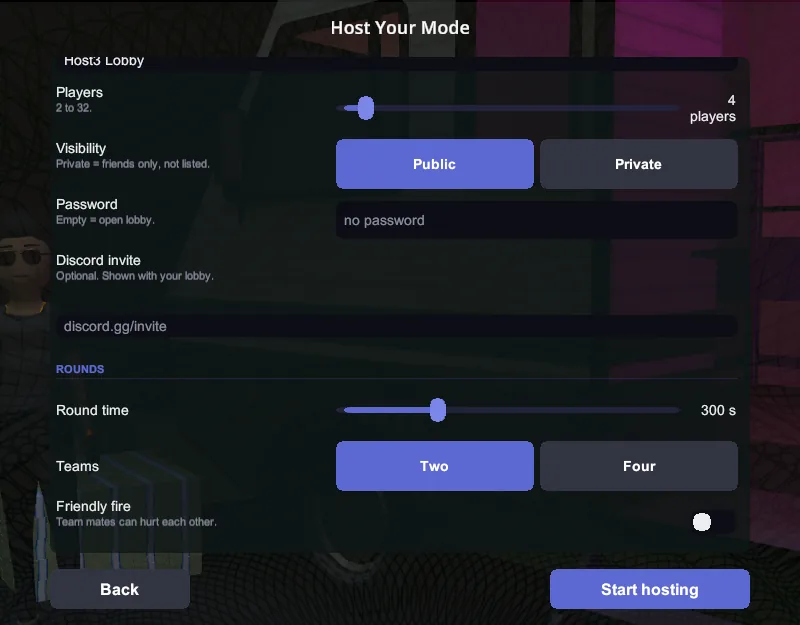
-
Host, then join with a second instance. Log
roundTimeon both: the values are the same.