Make your mod sync to other players
Give your mod a download source Side Hustle can use. A player who joins a lobby without your mod then gets it installed, or gets a direct link.
You need: a released mod. For the gamemode fields, a registered gamemode.
How Side Hustle finds your mod
Section titled “How Side Hustle finds your mod”The host lists every loaded mod with its version and SHA256 hash. For each mod it picks one source:
| Source | What the joining player gets |
|---|---|
| Thunderstore has a package with the installed version | Automatic install |
downloadLink points at a GitHub repository | Automatic download from its releases |
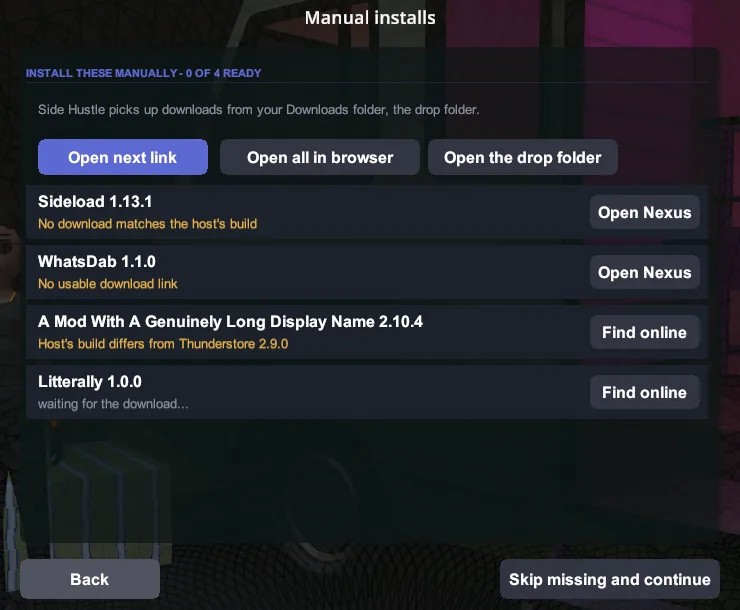
downloadLink points at Nexus, Thunderstore or doodesch.de | A checklist entry with that link |
| No usable source | Nothing. The player joins without your mod. |
Every download is checked against the host’s hash. A file with a different hash is never installed. The Thunderstore build of Side Hustle downloads no code. There, every mod is a checklist entry.
-
Set
downloadLink, the fifth argument ofMelonInfo. Use anhttpslink.[assembly: MelonInfo(typeof(Core), "Your Mod", "1.2.0", "You", "https://github.com/you/YourMod")] -
Tag each GitHub release with the version from
MelonInfo.v1.2.0,1.2.0and1.2.0.0all match. -
Attach the DLL, or a zip with the DLL, as a release asset. Side Hustle reads up to 3
.dllor.zipassets of up to 50 MB. -
Upload the same DLL file to every store. A rebuild has a different hash, and the download fails the check.
-
Keep secrets out of setting names you want synced. The host can sync mod settings to the session. A category with an entry name that contains
token,secret,password,webhook,apikeyorapi_keyis off by default, because lobby data is public.
For a gamemode
Section titled “For a gamemode”Set these on your GamemodeDescriptor:
DownloadUrl = "https://thunderstore.io/c/schedule-i/p/You/YourMode/",Advertise = true,- Players without your gamemode see its public lobbies with a “Download the mod” button. The button opens
DownloadUrl. - Only links to Thunderstore, Nexus, GitHub and doodesch.de open. Other links show but do not open.
Advertise = falsehides your lobbies from players without your gamemode. Use it while your gamemode is in development.
Check it works
Section titled “Check it works”-
Open the classic host form for a vanilla co-op lobby with your mod loaded.
-
The “Mod sync” note counts your mod: “install automatically”, “need a download link” or “cannot sync”.

-
For a gamemode lobby, the host log shows
[mp] join mod set published: N file(s) (A auto, G github, L link, U unsourced). -
Join from a second instance without your mod. Your mod shows as an automatic install or as a checklist entry with your link.