Add a slider
Add a slider to your Hotline panel. You drag it in the overlay or write it with hotline slider.
This page uses the Hotline API (Hotline.Api). For the Snitch API, see the Snitch slider guide.
You need: a Hotline panel. See Add a panel.
-
Call
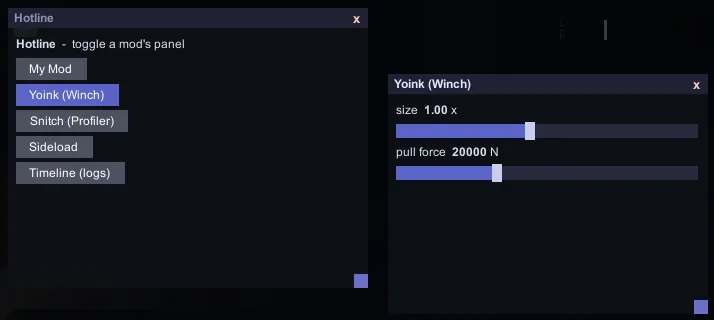
.Slideron your panel.using Hotline.Api;Hud.RegisterPanel("Yoink", "Yoink (Winch)").Slider("size", 0.2, 2.0, () => WinchItem.HeldScale, v => WinchItem.HeldScale = (float)v, 0.05, "x").Slider("pull force", 0, 60000, () => Preferences.PullNewtons, v => Preferences.PullNewtons = (float)v, 500, "N"); -
Pick a range wider than the values you expect. The ends are hard limits.
-
Give every slider in the panel a label that differs in its words. See “Label collisions” below.
The signature:
Panel Slider(string label, double min, double max, Func<double> get, Action<double> set, double step = 0d, string unit = null)| Parameter | Meaning |
|---|---|
label | Text next to the value. It also makes the slider id. |
min / max | Ends of the track. max must be greater than min. |
get | Reads the current value on the main thread while the panel draws. |
set | Applies a new value on the main thread. |
step | Snap increment. 0 means continuous. |
unit | Short suffix after the number, for example m, N, deg. Optional. |
The static form is Hud.RegisterSlider(panelId, label, min, max, get, set, step, unit).
Hotline clamps the value to [min, max] and snaps it to step before it calls set. Your setter needs no range check.
Check it works
Section titled “Check it works”- Press F6 and open the panel. The slider shows its label, live value and a filled track.
- Drag the knob. It follows the cursor until you release the button.
- Run
hotline slider Yoink:size. It prints the value, range and step. - Run
hotline slider Yoink:size 0.85. The value is clamped and snapped like a drag.
Label collisions
Section titled “Label collisions”A slider id is <panelId>:<slug of the label>. The slug keeps letters and digits, lowercases them and turns every other run of characters into one hyphen.
| Label | Id in panel Yoink |
|---|---|
size | Yoink:size |
pull force | Yoink:pull-force |
size -0.05 and size +0.05 | both Yoink:size-0-05 |
Two labels with the same id replace each other. No warning or log line appears, and the first control disappears. Use size down and size up, not size -0.05 and size +0.05.
- Register from the Unity main thread.
- A call is dropped silently if
maxis not greater thanmin, or ifgetorsetis null. - Registering the same id again replaces the slider. Running your registration twice is safe.
- On a Hotline without sliders, the call is a no-op.